
Sprint 14 closed: Memory Temperature Map
Sprint 14 is closed. Knowledge Vitality is now visible in Meronq Desktop as a force-directed CEM graph — hot, warm, cold, and archived — with session-local Expand / Pack dials that never mutate shared SQLite (ADR-0013).
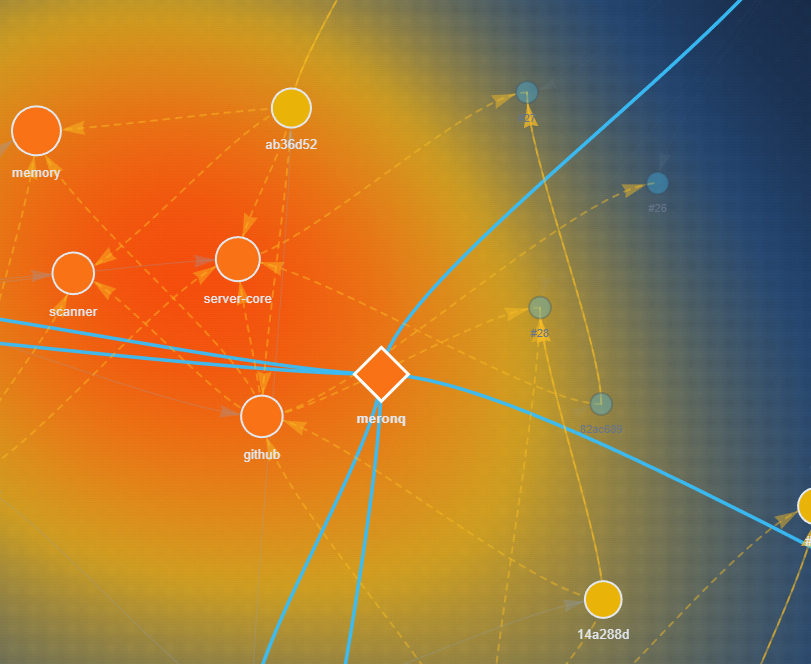
Desktop Temperature Map: vitality-colored nodes, semantic edges, and a continuous heat-relief field. Click the image for the full recap.
What shipped
MemoryStore.getGraphSnapshot— ranked subgraph with containment layers, plus derived semantic edges (part_of,evidenced_with) so the map is not only a sun ofcontainsthrough the project node.- Sidecar
GET /api/memory-graph— Desktop loads the temperature graph after Connect. - Temperature Map — vis-network layout with a continuous heat-relief background, multi-select, edge labels only for the selection, and a persistent mount so clicks do not remount physics.
- Expand / Pack — session focus budget + estimated focus bytes; selection pulls 1-hop neighbors into focus without rewriting team memory.
Principle
Sprint 12: real work leaves a signal.
Sprint 13: measure memory health — and understanding with control values.
Sprint 14: see the temperature of that memory, and steer attention locally.
MCP wrappers named memory_expand / memory_pack remain follow-up; the Desktop dials are the product vocabulary for the same viewport model.